Best Both Side Printing Printers for Efficient Double-Sided Prints
Choosing the best printer with automatic two-sided printing can enhance productivity and save paper. This article highlights some of the top-rated duplex printers ideal for home offices, small businesses, and professional environments. Below is a summary table showcasing the key features of each selected model to help you easily compare and make an informed decision.
| Printer Model | Type | Print Speed | Duplex Printing | Connectivity |
|---|---|---|---|---|
| Epson EcoTank ET-2850 | Color Inkjet | 10.5 ppm B/W, 5 ppm Color | Automatic | Wireless |
| HP OfficeJet Pro 8125e | Color Inkjet | 20 ppm B/W, 10 ppm Color | Automatic | Dual-band Wi-Fi |
| Brother HL-L2460DW | Monochrome Laser | 36 ppm B/W | Automatic | Wireless, Ethernet, USB |
| Brother HLL8360CDWT | Color Laser | 33 ppm Color | Automatic | Wireless, Ethernet |
| Brother HL-L2405W | Monochrome Laser | 30 ppm B/W | Automatic | Dual-band Wireless, USB |
Epson EcoTank ET-2850 Wireless All-In-One Printer

The Epson EcoTank ET-2850 is a cartridge-free supertank inkjet printer designed to ease printing costs while offering vibrant color output. With a print speed of up to 10.5 pages per minute (ppm) in black and 5 ppm in color, it is well-suited for home or small office settings. The resolution of 4800 x 1200 dpi ensures sharp text and vivid images.
Its automatic duplex printing feature supports two-sided printing without manual intervention. Wireless connectivity allows flexible placement and is compatible with scanning and copying functions, making it an all-in-one solution.
HP OfficeJet Pro 8125e Wireless Color Inkjet Printer

The HP OfficeJet Pro 8125e combines fast print speeds with professional color quality ideal for business documents such as reports, presentations, and flyers. It can print up to 20 ppm in black and 10 ppm in color and includes an automatic document feeder (ADF) with duplex printing for effortless two-sided jobs.
Its reliable dual-band Wi-Fi automatically detects connectivity issues for seamless network printing. The large 225-sheet input tray supports higher volume printing, making it suitable for busy home offices or small businesses seeking professional-grade output.
Brother HL-L2460DW Wireless Compact Monochrome Laser Printer

The Brother HL-L2460DW is a monochrome laser printer designed for fast, high-quality black and white document printing. It delivers up to 36 ppm, making it one of the quickest duplex printers on this list. This model is compact and energy efficient, optimized for home offices or small teams.
With versatile connectivity options including dual-band wireless, Ethernet, and USB, it supports reliable networking. The automatic duplex printing helps reduce paper use and streamline double-sided printing tasks.
Brother HLL8360CDWT Business Color Laser Printer
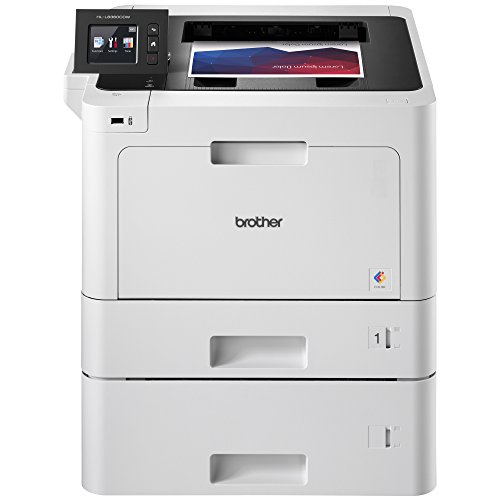
The Brother HLL8360CDWT is a robust business color laser printer boasting print speeds up to 33 ppm. It features dual paper trays with combined capacity of 750 sheets, minimizing downtime for paper reloads in busy work environments. Duplex printing is automatic, ideal for creating professional double-sided documents and presentations.
Connectivity includes wireless and Gigabit Ethernet, with mobile device compatibility via AirPrint and Brother iPrint&Scan. The white finish suits modern office aesthetics while delivering high-impact color print quality.
Brother HL-L2405W Wireless Compact Monochrome Laser Printer

The Brother HL-L2405W offers sharp monochrome prints at up to 30 ppm, making it a solid choice for home offices requiring duplex printing capabilities. Its compact size fits limited spaces, and wireless dual-band support allows multiple device connectivity.
Through the Brother Mobile Connect app, you can manage printer functions remotely and print from your mobile devices easily. It’s tailored for users who prioritize efficient black and white document output with automatic two-sided printing.
Buying Guide for Both Side Printing Printers
When selecting the best printer for double-sided printing, consider the following factors to ensure it meets your needs effectively:
1. Print Type and Quality
Decide between inkjet and laser printers. Inkjet printers generally excel in color quality and photo printing, while laser models offer faster printing speeds and crisper text, especially for monochrome documents.
2. Duplex Printing Capability
Ensure the printer supports automatic duplex printing, allowing the machine to print on both sides without manual intervention. This feature improves productivity and saves paper.
3. Speed and Volume
Review the pages-per-minute (ppm) rating to match your print volume. Higher ppm printers suit business environments with frequent large print jobs.
4. Connectivity Options
Look for wireless connectivity if you want flexible printing without cables. Dual-band Wi-Fi (2.4GHz/5GHz) offers more stable connections. Ethernet and USB ports provide wired options for reliability.
5. Paper Handling Capacity
Check input tray capacity to avoid frequent paper refills. Multi-tray and high-capacity printers are better for busy offices.
6. Multifunction Features
If you require scanning, copying, or faxing capabilities, consider all-in-one models that combine these functions with duplex printing.
7. Cost of Consumables
Ink or toner costs can significantly impact ownership expenses. Supertank or high-yield toner options reduce print costs over time.
8. Mobile and Cloud Printing
Support for printing via apps, AirPrint, or Google Cloud Print can enhance convenience, especially for remote printing from smartphones or tablets.
By carefully evaluating these aspects, you can choose a duplex printer that delivers efficient double-sided printing tailored to your workflow and budget.