Best Bluetooth All-in-One Printers for Home and Office Use
Choosing the best Bluetooth all-in-one printer means balancing wireless connectivity with versatile printing, scanning, copying, and sometimes faxing features. These multifunction devices streamline tasks whether for home, office, or mobile use. Below is a summary table showcasing five leading options that combine Bluetooth capability with robust printing solutions, ideal for various needs.
| Printer Name | Brand | Key Features |
|---|---|---|
| HP OfficeJet Pro 8125e Wireless All-in-One | HP | Color inkjet, auto duplex, ADF, wireless dual-band Wi-Fi, 225-sheet tray |
| Canon PIXMA TR4720 Wireless All-in-One | Canon | 4-in-1 (print, copy, scan, fax), auto document feeder, mobile printing |
| HP OfficeJet 250 Portable All-in-One Printer | HP | Compact portable design, wireless & mobile printing, battery included |
| HP LaserJet Pro MFP 3101fdw Black & White Laser | HP | Fast black & white printing, duplex, ADF, intelligent Wi-Fi |
| HP Envy 6555e Wireless All-in-One Inkjet | HP | Color printing, duplex, auto document feeder, HP AI layout optimization |
HP OfficeJet Pro 8125e Wireless All-in-One Printer

The HP OfficeJet Pro 8125e offers a reliable solution for home offices requiring quality color printing. It supports fast print speeds of up to 10 pages per minute (ppm) in color and 20 ppm in black and white. This model includes an automatic 2-sided printing feature and a 35-sheet automatic document feeder (ADF), enhancing productivity during complex jobs. Its 225-sheet input tray suits moderate volume printing demands. Equipped with upgraded dual-band Wi-Fi, it ensures seamless wireless connectivity and intelligent auto connection issue resolution. This multifunction printer handles print, scan, copy, and duplex functionality efficiently for varied business documents.
Canon PIXMA TR4720 All-in-One Wireless Printer

The Canon PIXMA TR4720 integrates print, copy, scan, and fax into an affordable yet comprehensive unit. Designed for home use, it features an automatic document feeder and supports mobile printing for convenience. This compact system consumes low power, maintaining energy efficiency with just 7W during operation and minimal standby usage. The model simplifies ink cartridge replacement, easing maintenance. Its print speed reaches about 8.8 pages per minute for black and white prints and 4.4 ppm for color, adequate for casual home printing needs while offering fax capability which is beneficial for small home offices.
HP OfficeJet 250 Portable All-in-One Printer
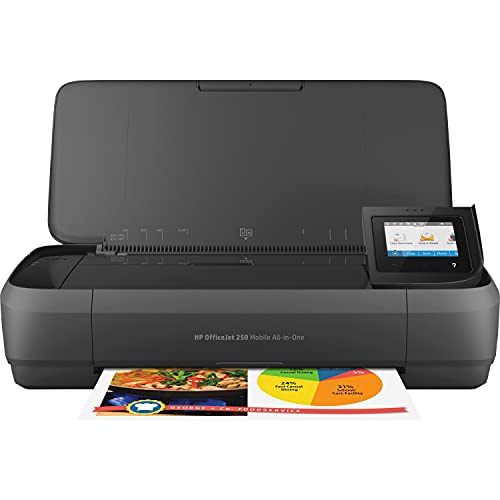
The HP OfficeJet 250 stands out for professionals needing a compact, portable printing solution. This all-in-one printer offers wireless and mobile printing without requiring network connections, providing great flexibility for business travelers or remote work setups. Its lightweight design fits easily into a backpack or briefcase, and it includes an integrated battery for true portability. It supports scanning and copying on the go. Utilizing the HP app, users can print and scan directly from smartphones or tablets, making it ideal for remote document handling.
HP LaserJet Pro MFP 3101fdw Wireless Black & White Printer

The HP LaserJet Pro MFP 3101fdw caters exceptionally well to small teams needing fast monochrome print output. It delivers printing speeds up to 35 pages per minute with crisp black & white quality. This multifunction laser printer offers scanning, copying, faxing, and automatic duplex printing. The automatic document feeder helps speed up batch jobs. It features intelligent Wi-Fi that continuously seeks the best connection to maintain reliable wireless performance. Best suited for office environments that prioritize volume and print speed over color output.
HP Envy 6555e Wireless All-in-One Inkjet Printer

The HP Envy 6555e is ideal for home users prioritizing color printing for projects such as homework and photos. It offers up to 7 ppm in color and 10 ppm in black. Notably, HP AI technology optimizes print layouts by removing unwanted webpage elements to minimize waste. It supports duplex printing, a 35-sheet auto document feeder, and a 100-sheet input tray. This model balances ease of use with efficient multi-functionality including print, scan, and copy, making it perfect for families and casual home offices.
Buying Guide for Bluetooth All-in-One Printers
Selecting the right Bluetooth all-in-one printer involves careful consideration of various features to match your environment and tasks effectively.
Connectivity
- Bluetooth Capability: Essential for direct wireless printing from Bluetooth-enabled devices without needing Wi-Fi or network infrastructure.
- Wi-Fi Integration: Many all-in-one printers support both Wi-Fi and Bluetooth for versatile connection options, including mobile device compatibility.
Printing Needs
- Color vs. Monochrome: Choose color inkjet printers for photos and graphics, laser printers for faster, high-volume black & white document printing.
- Print Speed: Consider pages per minute (ppm) that meet your workflow demands; higher ppm suits offices, moderate speed works for home use.
- Print Quality: Resolution and technology (inkjet vs. laser) affect sharpness, especially important for photo and professional document output.
Multifunction Features
- Scanning and Copying: Verify if the device has an automatic document feeder to speed up multitasking with multi-page documents.
- Fax Capability: Useful in many business scenarios though increasingly less common in home printers.
- Duplex Printing: Auto double-sided printing saves paper and time, a convenient feature found in many newer models.
Portability
- Size and Weight: Portable units with battery operation support mobile professionals who need printing on the go.
- Setup Flexibility: Ease of setup and use via apps or direct wireless connections can enhance usability away from traditional office setups.
Operating Costs
- Ink and Toner Replacement: Consider supertank or cartridge-free printers for cost savings on ink over time.
- Instant Ink or Subscription Services: Some brands offer ink subscription plans that maintain ink supply, which may benefit frequent users.
Evaluating these factors based on your specific requirements leads to choosing a Bluetooth-enabled all-in-one printer that delivers convenience, functionality, and cost-effectiveness.