Best AirPrint Adapters for Printers to Enhance Wireless Printing
Finding the best AirPrint adapter for your printer can significantly improve your wireless printing experience, especially for devices lacking native AirPrint support. Below is a summary table showcasing the top AirPrint adapters designed to connect various printer brands and models, offering features such as fast data transfer, broad compatibility, and easy installation.
| Product Name | Brand | Key Features |
|---|---|---|
| USB C Female to Printer Male Adapter (2-Pack) | QianLink | USB-C to USB B, 480 Mbps transfer speed, Plug and Play |
| Printer to USB Adapter USB A to B Converter Cable | Herfair | USB A to B converter, USB 2.0, Plug and Play |
| ROÉKO USB 2.0 Print Adapter, 2 Pack | ROÉKO | Type A Female to B Printer Male, Supports printers, scanners, fax machines |
| AreMe 2 Pack USB B to USB C Adapter | AreMe | USB C female to MIDI converter, 480 Mbps transfer speed |
| Omnihil AC/DC Power Adapter for XPrintServer | OMNIHIL | Power supply for AirPrint server, UL and ROHS certified |
USB C Female to Printer Male Adapter (2-Pack) by QianLink

The QianLink USB C Female to Printer Male Adapter supports fast data transfer speeds up to 480 Mbps, enabling seamless synchronization between devices. This adapter is designed for compatibility with popular printer brands including Brother, HP, Canon, Lexmark, Epson, Dell, Xerox, and Samsung. Its plug-and-play design means no installation is required, and safety is enhanced with a built-in 56KΩ pull-up resistor. The pack includes two adapters offering excellent value for users needing multiple connections or backups. Ideal for converting USB-C devices to standard USB-B printer ports.
Printer to USB Adapter USB A to B Converter Cable by Herfair

The Herfair USB A to B Converter Cable converts USB B ports commonly found in printers, scanners, and fax machines to USB A plugs, facilitating easy connection to laptops or desktops. This cable supports USB 2.0 standard with transfer speeds up to 480 Mbps for efficient printing tasks. Designed as a plug-and-play device, it requires no software or drivers. However, it is important to note that this adapter is not compatible with Epson devices or MIDI electronic instruments, focusing primarily on printer connectivity.
ROÉKO USB 2.0 Print Adapter, 2 Pack

The ROÉKO USB 2.0 Print Adapter comes in a convenient 2-pack, providing USB Type A female to USB Type B male printer connections. Compatible with printers, scanners, fax machines, and external hard drives, these adapters function without requiring software or special drivers, offering straightforward plug-and-play usability. They support the USB 2.0 standard ensuring reliable data transfer, making them a versatile choice for diverse USB B port devices.
AreMe 2 Pack USB B to USB C Adapter

The AreMe USB B to USB C Adapter enables connection of legacy USB B ports on printers, scanners, and other devices to modern USB Type-C cables. With a robust data transfer rate of up to 480 Mbps and support for MIDI equipment, these adapters are ideal for users balancing older peripherals with new USB-C technology. The adapters offer plug-and-play convenience without the need for additional drivers or software, supporting seamless integration in mixed device setups.
Omnihil AC/DC Power Adapter for XPrintServer by OMNIHIL
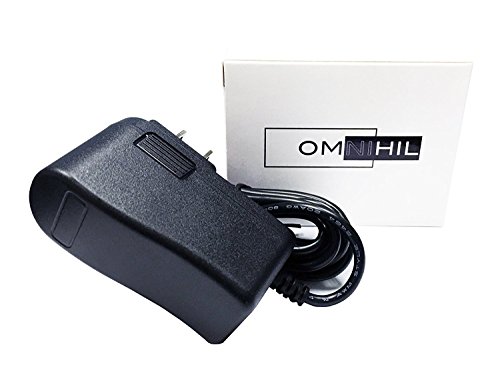
The Omnihil AC/DC Power Adapter supplies power for the Lantronix XPrintServer Office AirPrint Mobile Print Server, designed to enable AirPrint functionality for printers that lack native support. This UL and ROHS certified power adapter offers safe and reliable operation with a five-year free replacement warranty. It complements AirPrint adapter setups by ensuring stable power delivery to keep printing services uninterrupted.
Buying Guide for AirPrint Adapters
When selecting the best AirPrint adapter for your printer, consider the following important factors to ensure optimal performance and compatibility:
Compatibility
- Check whether the adapter supports your printer’s USB port type (USB B, USB C, USB A).
- Confirm compatibility with your printer brand and model to avoid connection issues.
- Verify if the adapter supports AirPrint functionality or requires additional devices like an AirPrint server.
Data Transfer Speed
- Look for adapters that support USB 2.0 or higher with transfer rates of up to 480 Mbps for efficient printing.
- Faster data transfer reduces wait time and improves print job reliability.
Plug and Play Ease
- Adapters that require no driver installation offer quick setup and greater convenience.
- Ensure the product explicitly states plug-and-play compatibility for a hassle-free experience.
Build Quality and Reliability
- Durable materials and built-in resistors enhance safety and extend the adapter’s lifespan.
- Choose products with warranties or good user feedback regarding reliability.
Additional Features
- Consider if the adapter supports additional devices beyond printers, such as scanners, fax machines, or musical instruments.
- Power adapters for AirPrint servers may be necessary for specific wireless printing setups.
Choosing an adapter that aligns with your printing environment alongside these factors will help you establish a seamless AirPrint-enabled connection, improving wireless printing convenience and efficiency in your home or office setup.